Designing for Inclusion
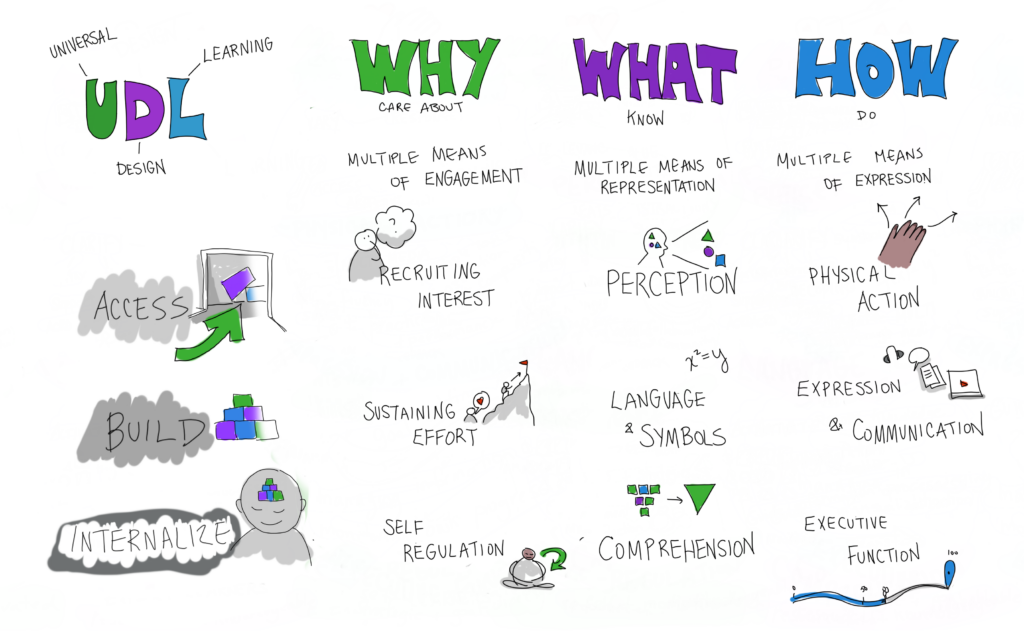
From: Inclusion, Diversity, Equity and Accessibility. The Why, What and How of Universal Design Learning.
The learning resource will be hosted on WordPress, which functions as a central home page for the learning modules. The site will include a short introduction and clickable modules aligned with the climate change topics, allowing students to move through the content at their own pace. Each module integrates text, images, videos, and simple interactive activities such as quizzes and matching tasks.
This design supports Universal Design for Learning (UDL) by providing multiple ways for learners to access and interact with the material. As shown in the UDL framework above, learning design can support three key areas: engagement (why learners care), representation (what they learn), and action and expression (how they demonstrate learning). In the WordPress modules, engagement is supported through interactive videos, games, and real-world climate action examples that help spark interest. Representation is addressed through a mix of text, images, diagrams, and videos that explain climate change concepts in different formats. Finally, action and expression are supported through activities such as quizzes, matching exercises, and even short reflections to think about, which allow learners to demonstrate their understanding in different ways.
Technology Choices

The resources we have curated cater towards a younger audience, such as with short form videos and interactive websites.
These online based resources will show how human activities warm the planet and answer common questions as well as dispel misconceptions about climate change.
Learners will be directed towards action‑focused hubs such as CleanBC’s “Actions you can take” page and the United Nations “ActNow” site give learners concrete ideas for what they can do at home, at school, and in their neighborhoods, helping them connect the science of climate change with hopeful, real‑world solutions while having fun.
To access the different modules, learners will need a device with a web browser, such as a computer, tablet, or smartphone, that can load the WordPress site, play embedded YouTube or similar videos, and display images and interactive quizzes. Videos will include transcripts to support accessibility. Depending on the learning environment, headphones may also be helpful if students are working through video modules at different speeds in a shared space.
Across the modules, learners will use the WordPress site to read text, view diagrams, and complete interactive activities. These activities may include drag-and-drop tasks, form-based sorting activities, matching exercises, and short quizzes designed to reinforce understanding.
